Desktop applications
macOS, Windows and Linux are the target platforms. zgx contains retained state, layout, input, editing, semantics, and widgets; zgx-gpu supplies wgpu rendering and shaped text; zgx-desktop hosts native windows, IME, clipboard, and accessibility. Linux native smoke tests run in this repository’s development environment. A Linux build does not prove macOS runtime behavior: run the same examples and platform CI on macOS before shipping there.
Dynamic window title, size, visibility and window-manager requests are documented in native window controls.
For application code, start with components, children, providers and slots and fluent styling. WindowContext::render(view) mounts a declarative tree and supplies component-owned tasks. The lower-level Ui methods documented below remain available for custom controls and renderer integration.
Run the component example, widget gallery or notes workspace:
cargo run -p zgx-desktop --example components
cargo run -p zgx-desktop --example gallery
cargo run -p zgx-desktop --example workbench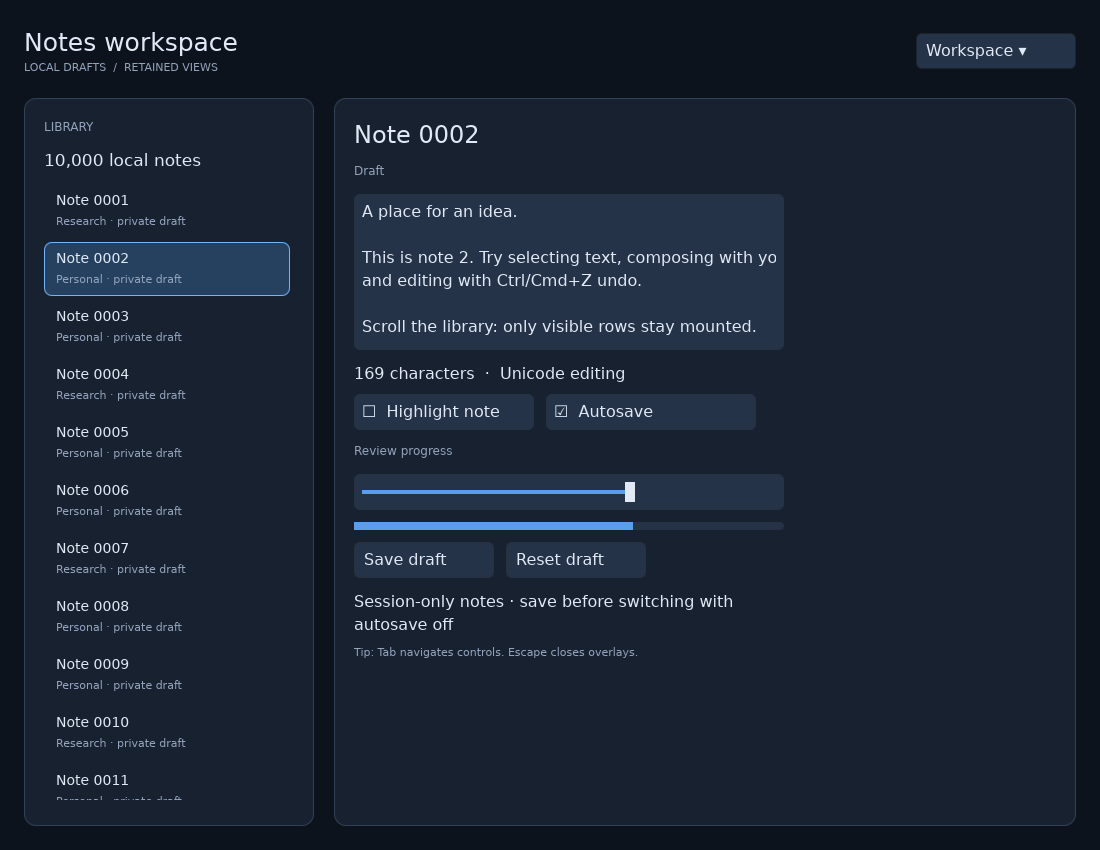
The workbench has a 10,000-row virtual library, a selection-driven detail form, Unicode text editing, session-only draft storage, an autosave toggle, sliders, a keyboard-navigable menu, and a confirmation dialog. Autosave writes visited drafts into an in-memory map; it does not write files. Closing the application discards that map. The shell and library viewport respond to window size; the detail editor has a fixed readable width and the workspace requires about 820 logical pixels horizontally to show its complete form.
A window and reactive widgets
use zgx::compose::prelude::*;
use zgx_desktop::{Application, WindowOptions};

fn greeting() -> View {
    component(|cx| {
        let name = cx.state(String::from("Hello"));
        let displayed = name.clone();
        column().w_full().h_full().p(24.0).gap(12.0)
            .child(text_input("Name", name).w(360.0).h(40.0))
            .child(text_signal(move || displayed.get()))
    })
}

fn main() -> Result<(), Box<dyn std::error::Error>> {
    Application::new()
        .window(WindowOptions {
            title: "My application".into(),
            width: 800.0,
            height: 600.0,
            ..Default::default()
        })
        .run(|cx| { cx.render(greeting()); })
}
The component constructor runs once for each mounted instance. Its state belongs
to that instance, and text_signal subscribes only to the values it reads.
Editing the input updates its bound signal and the retained label. Equal writes
do not schedule redundant updates. Reusable functions return View; containers
accept .child(...) or .children(...). Resolve shared models with
cx.service::<Model>() and use cx.slot(...) for caller-owned content.
Fluent .hover(...), .focus(...), .disabled(...), inherited typography and
.reactive_style(...) apply to these same retained views. See the
styling guide for exact methods and inheritance rules. Ui.theme
remains a construction-time default for low-level widgets; it is not a live
cascading theme engine.
Custom controls can use ui.bind(owner, callback) and ui.on_event(...) for
retained behavior. Low-level event callbacks receive capture, target or bubble
phases; check the phase to avoid duplicate actions. Prefer activation events for
buttons so pointer and keyboard input share behavior.
Layout and resizing
Rows and columns support fixed/intrinsic sizing, min/max constraints, margin insets, padding, gaps, flex grow/shrink, main-axis justification, and cross-axis alignment. Flex shrink defaults to 1, as CSS’s does: children give way in a container too small for them, each no further than its content’s min-content size (shrink_0() holds one). Overlays retain back-to-front child order. Text wrapping is opt-in through .text_wrap(true); the desktop host installs the same font system used by its renderer. Transform is translation-only.
Use .w_full(), .h_full(), flex styles and .reactive_style(...) for responsive component geometry. WindowContext.viewport supplies logical (width, height) when application policy depends on the window size. Low-level integrations can bind it to an owner and update retained styles or call ScrollView::resize. Release any RefCell<Scene> borrow before setting signals, because a signal can synchronously run code that borrows the scene. The host performs physical-pixel surface resizing and DPI conversion separately. Scene::prepare_layout makes geometry current for hit testing without discarding pending damage; flush is the renderer’s frame-consumption boundary.
To see what layout did, press Ctrl+Option+Cmd+I (Ctrl+Alt+Shift+I on Linux and Windows) in a window, run with ZGX_INSPECT=1, or call cx.inspector.set_enabled(true): the layout inspector (zgx::inspect) outlines every box and describes the one under the pointer (kind, size, position, padding, margin, border, flex properties, clip). ZGX_LAYOUT_WARNINGS=1 alone reports suspicious results to stderr once per node: a collapsed box with content, content cut off by a clip that does not scroll, a percentage inside a parent sized by its content. Off, neither costs anything per frame. Other hosts call Inspector::update(&ui, pointer) after Ui::prepare_frame while Inspector::active(); zgx::inspect::layout_warnings(&ui) checks once.
Scrolling and virtual rows
Use scroll(offset).children(...) for ordinary retained content and
virtual_list(...) for a large fixed-height collection. variable_virtual_list
accepts application-supplied row heights; measured_virtual_list measures mounted
children and keeps offscreen heights as estimates. Each takes a stable key and a
row builder returning View. Fluent viewport dimensions, .scrollbar(true) and
.keyboard_navigation(true) keep scrolling behavior within the child/component
architecture. Rows retain their state while mounted; removing an offscreen row
disposes its owned subscriptions and tasks. See virtual lists
for complete signatures, anchoring and cache costs.
The lower-level ScrollView::mount(ui, parent, width, height) returns a clipped viewport, a content node, and signals for offset, extent, and viewport size. Set its content height explicitly as data changes. Scroll offsets clamp when content or viewport dimensions change. Moving content changes a retained transform; it does not relayout every child. Nested wheel scrolling chains to a parent when the inner scroll view cannot
move farther, at the start of a gesture. Once a view scrolls, the gesture
latches to it, as on macOS. The rest of the gesture along that axis, momentum
included, goes to that view alone until a 300 ms pause, so it neither chains
outward at the edge nor jumps to an inner view that slides under the pointer.
A view takes only its own axis of a diagonal swipe and passes the other on, so
a vertical swipe over a horizontal carousel still scrolls the page.
The keyboard scrolls as a page does when nothing has focus. This covers scroll views, scrollable areas and virtual lists. Space and Shift+Space, Page Up/Down (87.5% of the viewport), Home/End and the arrows (40 points) scroll the view around what was last pressed, else under the pointer. A focused control keeps its keys: an editor’s, a button’s Space, a list’s keyboard navigation.
VirtualListView::mount takes a count, fixed row height, overscan, stable key function, and row initializer. It retains only visible rows plus overscan. Overlapping visible keys keep their node IDs and scopes; offscreen scopes are disposed. The initializer receives a ViewScope, so it can mount text, descendants, and subscriptions. scope.retain(input.register(...)) ties an input binding to that row’s lifetime. Store persistent edits and selection in a model keyed by item identity: an offscreen row deliberately does not keep a hidden widget alive. This low-level VirtualListView remains fixed-height; variable and naturally measured rows use the component APIs above.
Menus and dialogs
Component applications can use modal(label, open).children(...) or
popover(label, open, anchor).children(...). Styles describe the panel; portals
manage window placement, clipping escape, retained ownership, focus containment,
dismissal and automatic resizing/anchor tracking. Both are modal dialogs, including
the anchored popup. Escape/backdrop dismissal writes false to the supplied
signal. See the component guide for lifecycle and nested/sibling
behavior. For action menus use menu(label, open, anchor) with menu_item(label) children;
activation closes the menu before callbacks, and keyboard navigation/overflow are
managed internally. Add submenu(label, child_open).children(...) for cascading
actions with owned triggers, side placement and Right/Left navigation. The imperative APIs below remain available for existing
low-level code.
Mount Dialog or Popover in a full-window Layout::Overlay layer. Populate the dialog’s body, then call show. Open dialogs trap pointer and keyboard focus; Escape and optional backdrop activation dismiss them and restore the previous eligible focus. Nested dialogs belong beneath the active dialog root. Closing an outer dialog unwinds nested scopes and closes their state. Closed overlays remain retained but disabled until removed. Opening refreshes dialog sizing against the current viewport; bind dialog.resize_to_viewport() to the host viewport signal to recenter a dialog during live window resizing.
Popover::item creates menu items with Up/Down/Home/End navigation, disabled-item skipping, and dismissal before activation. popover.show(&ui) positions against its anchor and clamps to the current viewport. From a retained callback, use show_with(&scene, &input) instead of capturing the entire Ui. Position is refreshed on opening; continuous anchor-following while the menu remains open is not implemented.
Popups past the window
Popups, drags and windows across the screen ties this together with drags out of and between windows, tear-off, and the Window menu.
On macOS anchored popups reach past their window, as AppKit’s menus and
popovers do, with nothing asked of the app: a menu at a window’s bottom edge
hangs below it, a tooltip at its top shows over the title bar. Each flips and
clamps to the visible part of the screen its trigger is on (Ui::set_popup_screens,
which the host keeps current). An open popup’s subtree stays in the window’s
scene, with its focus, keys and dismissal, but is a popup root
(Scene::set_popup): the window’s renderer leaves it out and a borderless,
transparent, non-activating child panel shows it, drawn by a renderer of its
own that shares the window’s device and text caches, at the scale of the
screen it shows on. The window stays key, so typing reaches a field in a
popover; the panel’s pointer input reaches the window’s scene in its
coordinates, past its edges.
They behave as AppKit’s: a menu opens as its trigger is pressed (dragged to an
item and released there, the item is chosen; released over the trigger, the
menu stays open to click in), its chosen item flashes and it fades out as it
closes, and View::open_over opens a pop-up button’s menu with the chosen
item over the button. A panel with a translucent background gets AppKit’s
material behind it (the menu material for menus, the popover material
otherwise), cut to its rounded corners; the theme’s menu.bg and popover.bg
are clear there, so menus and popovers look as AppKit’s unless an app styles
them. Popups close as their window or the app loses focus, on a press in the
window’s title bar, and on Escape or a press outside them.
An app that never opens a popup pays nothing: no popup window is made until
the pointer first reaches something that opens one (Ui::on_popup_soon), and
a closed popup is no popup root. Opening one is a move and one small frame.
Closed popup windows are kept, hidden, to reuse; a hidden one draws nothing
and never wakes. Windows shows popups in owned popup windows, X11 in
override-redirect windows, and Wayland in xdg_popups of the window, which the
compositor places and keeps on its outputs (Linux).
ZGX_POPUP_WINDOWS=0 keeps popups inside the window.
Windows as AppKit keeps them
On macOS every zgx app has a Window menu: the app’s own if it has a menu titled “Window”, else a standard one (Minimize, Zoom, Bring All to Front) after its menus. AppKit lists the app’s windows in it, adds its tab and tiling commands, and ⌘` cycles through them.
A window opened with no position (WindowOptions::bounds without one, and no display) cascades from the app’s front window, as AppKit’s document windows do, rather than opening over it. WindowOptions::frame_autosave = Some(name) saves its frame under that name as it moves and resizes, and opens it where it was left. WindowOptions::tabbing joins AppKit’s window tabs as the user’s setting says (Tabbing::Automatic), always (Preferred), or never (Disallowed, for windows with tabs of their own, as Safari’s), and tabbing_identifier keeps windows of different kinds apart. WindowOptions::under_pointer opens a window with a point of its content under the pointer, for a tab torn off its window (drag and drop).
A layer over the desktop, as an intro playing over whatever is open (cargo run --release -p zgx-desktop --example agents_intro): WindowOptions::covers_display places the window over its display’s whole frame (the selected display, else the primary) rather than in a fullscreen space; with transparent, decorations: false and shadow: false nothing of a window shows but what zgx paints, level: WindowLevel::AlwaysOnTop keeps it over every app’s windows (macOS’s floating level, Windows’ topmost), and WindowHandle::set_pointer_passthrough(true) lets the pointer through to what is behind until there is something to press. set_level and set_shadow change those later. Every window lays out at the size it opened at from its first frame (bounds, a saved frame, a display it covers), not at width and height first.
cargo run --release -p zgx-desktop --example window_probe checks the Window menu, the cascade and the autosave with events posted to its own windows. ⌘is a system hotkey AppKit hears from the window server, not a key event an app can post itself, so it is checked by hand: it cyclestab_windows`’ windows (macOS 26).
On Windows a window opened with no position opens where Windows puts it (CW_USEDEFAULT: each new window a step on from the last, as Notepad’s). frame_autosave keeps the window’s placement (its restored frame, and whether it was maximized) in the registry under HKCU\Software\zgx\<executable>\Frames, as it moves, resizes, snaps and closes, and reopens it there, maximized if it was left so, unless no monitor still shows its title bar (a monitor since unplugged): then it opens where Windows puts it. under_pointer works as on macOS. Windows has no window tabs: tabbing and tabbing_identifier do nothing there, and there is no Window menu. python scripts/windows_window_smoke.py target/debug/examples runs window_probe there.
On X11 a window opened with no position opens a step on from the app’s front window (the active window if it is the app’s, else the last one opened), down and right by its title bar’s height, back at the work area’s top-left when that would take it past the work area; with no window of the app’s shown, it opens where the window manager puts it. It asks for the position as the program’s (PPosition), so window managers that place every window still may. frame_autosave keeps the window’s frame (where it was, its size, and whether it was maximized, the frame being the one from before it was maximized) in $XDG_STATE_HOME/zgx/<executable>/frames (by default ~/.local/state), saved half a second after the window last moved or resized, and as it closes. It reopens there, maximized if it was left so; at a frame no monitor still shows, it opens where the window manager puts it, at the saved size. On Wayland the compositor places every window and the app cannot know where: a saved frame keeps its size and whether it was maximized. under_pointer works on X11 as on macOS. There are no window tabs: tabbing and tabbing_identifier do nothing. python3 scripts/window_frames_smoke.py target/debug/examples/window_probe --output <dir> checks all of it under Xvfb and Openbox, and the Wayland part under Weston.
Ownership, tasks, and disposal
A mounted component owns its local state, bindings, child components and tasks
spawned with its Context. Conditional and keyed child regions retain matching
owners and dispose removed ones. cx.slot(...) captures the caller’s lexical
providers while mounting the body under the receiver’s lifetime. Applications
using this API do not need node IDs or explicit subtree removal.
For low-level integration, Ui owns widget bindings and subscriptions. Returned widget/component handles refer to that retained document; dropping a handle does not remove the widget. Call Ui::remove(node) to unmount a widget subtree and release its owned subscriptions, editor state, semantics, and input registrations. Do not directly remove Ui-owned nodes through Scene when you expect their owner metadata to be released immediately.
ViewScope provides a smaller RAII owner for template-generated or custom subtrees. It owns descendants, effects, inherited typed services, and resources retained with retain. Dropping it disposes resources and subscriptions before removing its scene root. KeyedChildren adds key validation, retained reorder, and keyed disposal. Duplicate input keys are rejected before mutation. Scopes share their scene through Rc<RefCell<_>>; do not keep a scene borrow across a scope drop, a signal write, or a user callback.
cx.tasks.spawn(async move { ... }) schedules local futures and wakes the native loop when work becomes ready. zgx::timer::sleep is an awaitable timer; yield_now yields to another executor turn. Do not hold a reactive batch guard or scene borrow across .await. UI objects stay on the UI thread; use the host’s thread-safe request interfaces and channels for background work instead of moving Rc-backed state between threads. Window tasks are dropped when that window closes. For native view-owned work, use scope.retain(cx.tasks.spawn_scoped(async move { ... })). Its ScopedTask guard releases future captures when canceled, even before the host drains its pending queue, and wakes sleeping executor entries for cleanup. See scoped native tasks for a complete example. ViewScope::spawn and LocalExecutor::spawn_scoped remain available when you own the executor directly; their cancellation releases the future on its next ready turn. Plain cx.tasks.spawn is window-owned, so removing a widget does not cancel it.
Animation frames
Animate from the window’s frame clock rather than a timer. cx.frames() in a component (or WindowContext::frames) returns a zgx::frame::FrameClock; awaiting frames.next() resolves once per display refresh with a Frame whose time is the expected presentation time. Drive animations from that value, not Instant::now(), so they advance by whole refreshes even when the UI thread runs late. The host only ticks while a request is waiting, so an idle window does no work, and hidden, minimized or occluded windows pause until they are shown again.
let frames = cx.frames();
let angle = cx.state(0.0_f32);
let set = angle.clone();
cx.tasks().spawn(async move {
    let start = frames.next().await.time;
    loop {
        // A decorative spinner does not need every refresh of a 120 Hz display.
        let frame = frames.next().max_rate(30.).await;
        set.set((frame.time - start).as_secs_f32() * 3.);
    }
});
max_rate(hz) limits one request. Limited requests are spaced by whole refreshes (30 Hz on a 120 Hz display is every fourth refresh; a limit that does not divide the display rate rounds down, never exceeding it), and requests with the same effective rate tick together. WindowOptions::max_frame_rate and WindowHandle::set_max_frame_rate cap every animation in a window, for example to save power; input-driven redraws are not limited. On macOS the frames come from a CADisplayLink on the window’s view, which follows the window across displays and lets ProMotion panels lower their rate when every waiting request accepts fewer frames. Wayland paces through compositor frame callbacks. X11 and other platforms tick on event-loop deadlines at the display’s reported refresh rate (DisplayInfo::refresh_rate_hz, 60 Hz when unknown). A native source that stops ticking while frames are wanted is backed by the same timer after 250 ms. The frame clock example shows the cap and a limited request; --smoke-test measures the delivered rates.
Background work and window lifecycle
BackgroundPool::new(workers, queue_capacity) creates an explicitly bounded worker pool. Its spawn method returns either a result future or SpawnError::QueueFull; it never grows an unbounded work queue. Await the future from a UI task, then update local signals. A panic in a job becomes TaskError::Panicked; a worker continues accepting work. Dropping a result skips queued work or discards a running result. Running closures cannot be forcibly interrupted. Dropping the last pool cancels queued jobs and lets running jobs finish without blocking the UI.
let pool = zgx::background::BackgroundPool::new(2, 16)?;
let job = pool.spawn(move || std::fs::read(path))?;
cx.tasks.spawn(async move {
    match job.await {
        Ok(Ok(bytes)) => status.set(format!("Loaded {} bytes", bytes.len())),
        Ok(Err(error)) => status.set(error.to_string()),
        Err(error) => status.set(error.to_string()),
    }
});
// Keep the pool in an application service while its queued work is needed.
Use cx.windows.open(options, builder) to create another window. An application’s windows share one reactive runtime (Ui::with_runtime): each has its own scene, focus and tasks, but a signal one window shows, another can change, and a theme change restyles them all. Closing an opener does not close its child windows. The application exits when no windows or pending window requests remain. WindowHandle is thread-safe and targets exactly one window; requests after closure are inert.
cx.on_close_requested(|| bool) handles native close requests and window.request_close(): return false to keep the window open, for example while a save-confirmation dialog is shown. window.close() closes immediately and bypasses that policy. cx.on_closed(|| ...) runs once during window disposal. Asynchronous confirmation should reject the initial request and call close after the user completes it.
When something fails
An app keeps running through what goes wrong while it runs, where that is safe:
- A panic in an event handler, an effect or a task is contained by the desktop host: the panic hook logs it as usual, the window shows a banner saying what went wrong (a click dismisses it; assistive technology reads it out), and the app goes on. zgx keeps its state consistent across the unwind: borrows, subscriptions and focus recover. Panics that keep coming (20 within a second) end the app with the last one’s message, rather than spin.
- A lost GPU device (a driver reset, an external GPU removed) fails the window’s frames with
GpuError::is_device_lost; the window makes a renderer on a new device and draws again in full, with its state as it was. Until one can be made it tries again each second.WindowHandle::debug_lose_gpu()loses it on purpose, for tests. A lost or outdated surface is recreated without either. - A script’s runtime error is logged and shown over the window in debug builds (
ScriptHost::error); the rest of the script keeps working. - A missing image draws empty in its place, its error reported as a script error is; a font that isn’t installed falls back to the system’s.
Other errors (a window that can’t be made, layout that never settles) still end the app with the error, as before.
Future templates
The proposed service, provider, view, slot, and event syntax remains a future compiler front end. The current Rust API does not imitate that syntax. A compiler can lower providers to provide/provide_with, state to Context::state, views to component, keyed loops to keyed, visible list windows to the component virtual-list constructors, and event actions to view handlers and component-owned tasks. Slots must retain lexical service/state captures while attaching their mounted subtree to the receiving view’s ownership. See architecture for the concrete lowering table and retained cost model.
This is an evolving framework API. It does not claim a stable ABI, complete CSS layout, arbitrary affine transforms, or full rich-text editing. Hardware-backed performance and macOS behavior require platform-specific validation in addition to the repository’s unit and Linux smoke tests.